Comparisons
Reminder Apps vs Text Message Reminders
Reminder Apps vs Text Message Reminders
You remember something while standing in a grocery-store parking lot.
The car needs an oil change next month.
You unlock your phone.
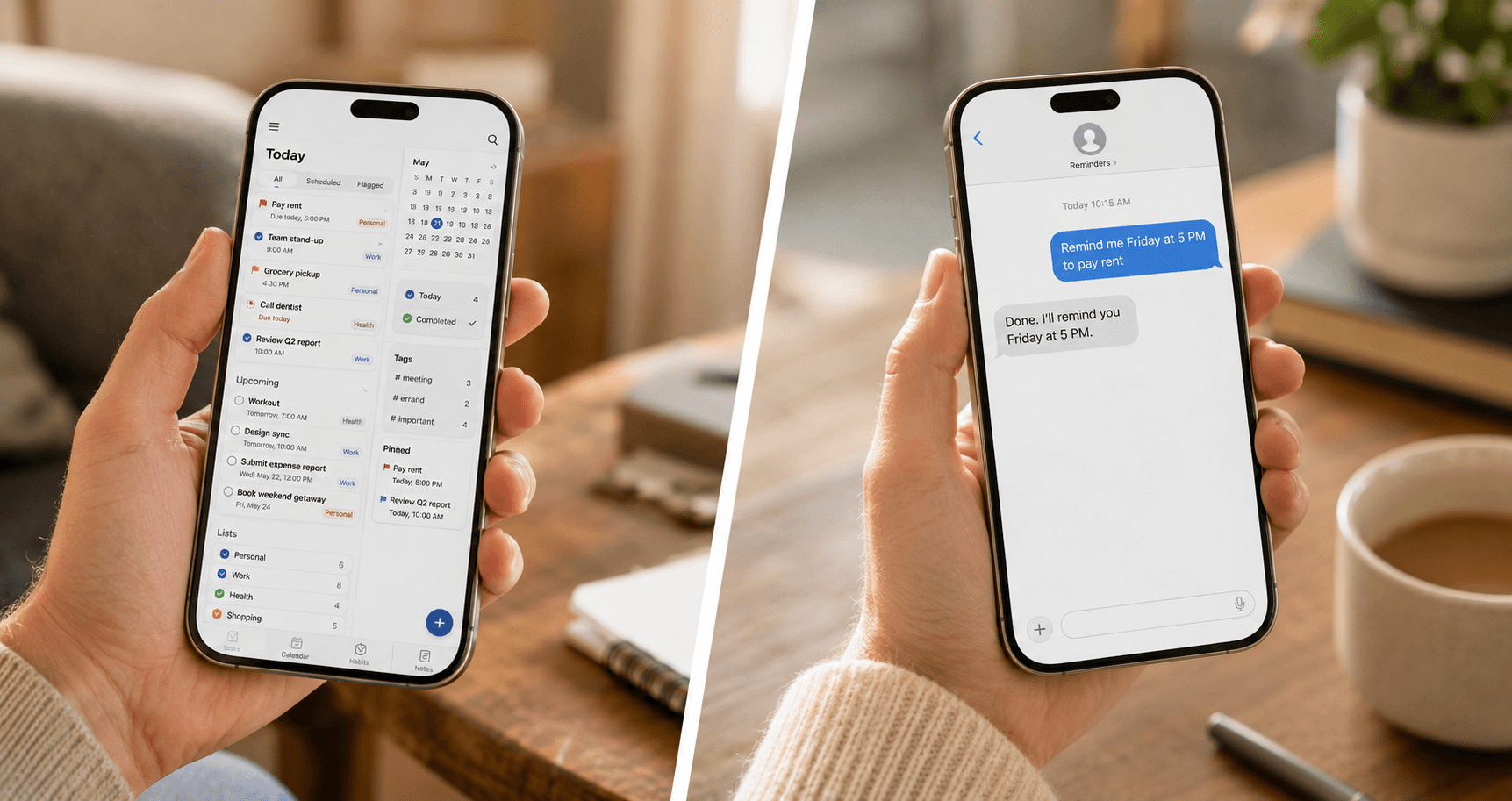
The reminder app is somewhere in a folder. When you open it, you are asked to choose a list, set a priority, select a date, decide whether it repeats and confirm notification settings.
You tell yourself you will do it later.
You do not.
This is the uncomfortable truth behind many productivity tools: a system can be powerful and still fail at the exact moment you need it.
The question is not only which option has more features.
It is which option creates the least friction between remembering a task and safely storing it.
The two approaches
Dedicated reminder apps
These include built-in phone reminders, task managers and productivity platforms.
They commonly offer:
- Lists and folders.
- Due dates.
- Recurrence.
- Priority levels.
- Tags.
- Subtasks.
- Shared lists.
- Calendar views.
- Integrations.
- Location-based triggers.
Text message reminders
These use a familiar message thread as the capture interface.
The typical flow is conversational:
"Remind me next Tuesday at 9 AM to call the dentist."
The service interprets the request, confirms it and sends the reminder at the chosen time.
The feature set may be narrower, but the capture behavior is familiar: type a sentence and send it.
The real comparison: friction
A reminder system has two jobs.
First, it must make capture easy enough that you use it.
Second, it must make delivery noticeable enough that you act.
Many comparisons focus only on the second job.
But a perfectly timed notification cannot help with a task you never entered.
Reminder apps can create setup friction
A dedicated app may require several decisions before a task is saved.
For users who enjoy structure, those options are useful.
For someone already overloaded, each field can become a small obstacle.
Texting reduces interface decisions
Texting is already a habitual behavior for most phone users. The user can express the intention in ordinary language without navigating a project hierarchy.
That does not automatically make texting superior.
It makes texting lower-friction for certain tasks.
Side-by-side comparison
| Factor | Reminder apps | Text message reminders | |---|---|---| | Initial capture | May require opening an app and selecting fields | Usually type a sentence in an existing message thread | | Complex projects | Strong | Limited | | Recurring reminders | Commonly supported | Can be supported conversationally | | Lists and categories | Strong | Usually minimal | | Shared work | Often available | Varies by service | | Learning curve | Low to high depending on app | Generally low | | Visibility | Depends on app notifications and habits | Appears in the messaging environment | | Best use | Projects, planning and organized task systems | Quick, time-specific and recurring commitments | | Risk | Over-organization or abandoned app | Too little structure for complex work |
When reminder apps are better
A dedicated app is usually the stronger choice when you need to manage a body of work rather than a single future action.
Examples:
- Launching a website.
- Planning a move.
- Coordinating a team.
- Managing a renovation.
- Tracking a multi-step application.
- Sharing household responsibilities.
- Organizing work by project, owner and status.
These situations benefit from views, dependencies, notes and grouping.
A text thread is not an ideal project-management dashboard.
When text reminders are better
Text reminders are particularly useful when the task is easy to express and timing is the main requirement.
Examples:
- "Remind me at 4 PM to pick up the prescription."
- "Remind me every Thursday night to take out trash."
- "Remind me in 10 days to follow up with the contractor."
- "Remind me December 1 to renew the registration."
- "Remind me tomorrow morning to bring the school form."
The user does not need a project.
The user needs the commitment to return.
The visibility problem
Every reminder system eventually competes with other notifications.
Research on notification interruptions suggests that reducing interruption frequency can improve performance and reduce strain. This creates a design challenge: reminders must be noticeable without becoming part of the noise.
Dedicated apps may be buried among dozens of app alerts.
Text reminders benefit from appearing in a communication channel people already monitor, but they can also be diluted if the message inbox is extremely busy.
No delivery channel is automatically effective.
The system must earn attention by sending fewer, more relevant reminders.
The organization trap
Organization feels like progress.
Sometimes it is.
Sometimes the user spends more time selecting labels, colors and folders than completing the task.
A useful rule:
Use structure only when the structure improves a future decision.
A tag is valuable if you will filter by it.
A priority level is valuable if it changes what you do.
A project folder is valuable if it helps you see a multi-step outcome.
For a simple reminder to pay rent Friday, additional structure may be unnecessary.
The notification trap
The opposite problem is under-organization paired with over-notification.
If every captured thought becomes an alert, the system trains the user to dismiss it.
Effective reminders should be:
- Specific.
- Timely.
- Actionable.
- Limited to moments when attention is useful.
"Do taxes" at 9:00 a.m. on a workday may be technically correct and behaviorally weak.
"Saturday at 10:00 a.m.: Download tax forms and place them in the accountant folder" is more actionable.
The tool matters. Reminder design matters more.
A practical hybrid system
You do not have to choose one tool for every kind of work.
A simple hybrid can look like this:
Use text reminders for
- Appointments.
- Pickups.
- Bills.
- Calls.
- Medication.
- Recurring household tasks.
- Follow-ups.
- Renewals.
Use a task manager for
- Projects.
- Multi-step goals.
- Shared work.
- Research.
- Backlogs.
- Detailed notes.
- Tasks without a fixed time.
Use a calendar for
- Events that occupy time.
- Meetings.
- Travel.
- Appointments.
- Time blocks.
Each tool has a job.
That prevents the reminder app from becoming a warehouse and the calendar from becoming a to-do list.
Pocket Assistant example
Suppose you remember at 9:46 p.m. that the credit card is due next week.
You do not want to open a finance app or build a task.
You send:
"Remind me Monday at 7 PM to pay the credit card."
Done.
I'll remind you Monday at 7 PM.
The experience is intentionally small.
The system captures the commitment in the same amount of time it takes to text another person.
Questions to ask before choosing
How quickly can I capture a task?
Test the system when you are walking, busy or tired—not only when you are sitting at a desk.
Will I naturally return to this interface?
A tool you admire but rarely open is not a trusted system.
Does it support the reminders I actually need?
Consider recurrence, lead times, confirmations and time zones.
Can I tell whether the reminder was understood correctly?
Natural-language systems should confirm the date, time and task.
Does it create more notifications than value?
A reminder channel should remain meaningful.
What happens when the request is unclear?
A good system asks for clarification rather than silently scheduling the wrong thing.
Common mistakes
Choosing based on feature count
More features can increase capability and friction at the same time.
Replacing a failed system with a more complex one
Failure may come from capture behavior, not missing functionality.
Using one tool for every responsibility
Projects, events and reminders are related but different.
Ignoring notification settings
A system cannot help if delivery is disabled, hidden or routinely dismissed.
Failing to review recurring reminders
Life changes. Old recurrence rules should be updated or removed.
So, which one actually gets used?
For a person who enjoys planning and regularly works from lists, a dedicated reminder app may become a reliable command center.
For a person who remembers tasks in the middle of life and wants to capture them in one sentence, text reminders may be easier to sustain.
The best system is not universal.
It is the one with the lowest friction at your moment of capture and enough structure for the task you are managing.
Key takeaways
- Feature depth and daily usability are different measurements.
- Reminder apps are stronger for projects and structured task management.
- Text reminders are strong for low-friction, time-specific capture.
- Delivery must remain noticeable without becoming noise.
- A hybrid system often works better than forcing one tool to do everything.
- The best system is the one you consistently use.
Final thought
Simple tools are not always better.
But for simple commitments, simpler capture can be the difference between saving the task and losing it.
The Pocket Assistant is designed for that narrow moment: you remember something, text it and move on.
Ready to stop forgetting?
Start your 10-day free trial. Set your first reminder in the next 5 minutes.
Start Free Trial →